> ## Documentation Index
> Fetch the complete documentation index at: https://docs.getjumper.io/llms.txt
> Use this file to discover all available pages before exploring further.
# Avid Media Composer Troubleshooting
> Troubleshooting Jumper for Avid Media Composer
## Panel won't open
On newer versions of Avid Media Composer (2025.12 and later), Jumper is now available in the Extensions menu.
Go to **Tools -> Console**
In the Console window that opens, type in
panelsdk reinit
and hit Enter
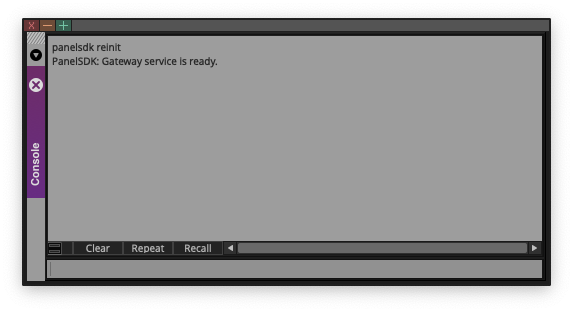 If you get some error message, enter the command again until you see "PanelSDK: Gateway service is ready."
If Jumper still doesn't appear, restart your computer. Several users have found this fixes it (we're not sure why, and are actively discussing with the Avid team).
## Can't add media
Media won't load or you see "can't link to a clip"? See [Adding media](/NLE/avid/avid-adding-media#cant-add-media) for the full workflow and common fixes:
* **Clips not selected** — For **All Selected Clips**, select clips in the bin before clicking Load Media.
* **Scan not run** — For unanalyzed transcoded MXF, run **Scan MXF Metadata** first. Analyzed MXF can skip the scan step.
## Mark IN/OUT or Source Viewer search fails
Jumper uses Avid's default **I** (Mark IN), **O** (Mark OUT), and **Q** (Go to IN point) shortcuts. Custom shortcuts for these keys will break navigation and Source Viewer search.
See [Required shortcuts](/NLE/avid/avid-guide#required-shortcuts) in the installation guide.
## Scan MXF Metadata / Scan Avid MediaFiles fails
If **Scan MXF Metadata** or **Scan Avid MediaFiles** still doesn't successfully scan the drive that contains your Avid media, contact us on the [Discord](https://discord.getjumper.io).
## Installation issues
If the Jumper panel fails to install or enable:
1. **Close Avid and helper apps** — Quit Avid Media Composer and `avid-api-gateway` (and any other Avid helper processes) in **Activity Monitor** (macOS) or **Task Manager** (Windows) before enabling Jumper.
2. **Re-run the enable step** — In Jumper.app, click **Enable Jumper in Avid Media Composer** again.
If you get some error message, enter the command again until you see "PanelSDK: Gateway service is ready."
If Jumper still doesn't appear, restart your computer. Several users have found this fixes it (we're not sure why, and are actively discussing with the Avid team).
## Can't add media
Media won't load or you see "can't link to a clip"? See [Adding media](/NLE/avid/avid-adding-media#cant-add-media) for the full workflow and common fixes:
* **Clips not selected** — For **All Selected Clips**, select clips in the bin before clicking Load Media.
* **Scan not run** — For unanalyzed transcoded MXF, run **Scan MXF Metadata** first. Analyzed MXF can skip the scan step.
## Mark IN/OUT or Source Viewer search fails
Jumper uses Avid's default **I** (Mark IN), **O** (Mark OUT), and **Q** (Go to IN point) shortcuts. Custom shortcuts for these keys will break navigation and Source Viewer search.
See [Required shortcuts](/NLE/avid/avid-guide#required-shortcuts) in the installation guide.
## Scan MXF Metadata / Scan Avid MediaFiles fails
If **Scan MXF Metadata** or **Scan Avid MediaFiles** still doesn't successfully scan the drive that contains your Avid media, contact us on the [Discord](https://discord.getjumper.io).
## Installation issues
If the Jumper panel fails to install or enable:
1. **Close Avid and helper apps** — Quit Avid Media Composer and `avid-api-gateway` (and any other Avid helper processes) in **Activity Monitor** (macOS) or **Task Manager** (Windows) before enabling Jumper.
2. **Re-run the enable step** — In Jumper.app, click **Enable Jumper in Avid Media Composer** again.