> ## Documentation Index
> Fetch the complete documentation index at: https://docs.getjumper.io/llms.txt
> Use this file to discover all available pages before exploring further.
# Agentic editing
> AI agents operating Jumper to orchestrate multi-step media workflows
export const ChatStatus = ({children}) => {
return ;
};
export const ChatResponse = ({children}) => {
return ;
};
export const ChatMessage = ({children}) => {
return ;
};
export const Chat = ({children}) => {
return ;
};
 ## Overview
Agentic editing lets AI agents operate Jumper directly (searching your footage, retrieving clips, and triggering workflow actions) through an MCP server. Jumper integrates with Claude Code Desktop, Claude Code CLI, OpenAI Codex Desktop, and LM Studio, so you can give a natural-language task to an agent and have it break the work into steps and execute them.
Instead of clicking through searches and exports yourself, you describe what you want in plain language. The agent queries Jumper's backend, orchestrates the workflow, and produces the result (clips, sequences, exports) without you having to perform each step manually.
## What agents can do
### Same as you
Agents can use Jumper much like you do through the interface:
* **Search visually** across analyzed footage using natural language
* **Search transcriptions** for spoken words and phrases
* **Retrieve clip segments** with start and end times
* **Find similar clips** by text, image, or frame
* **Find clips by face recognition** (people search)
* **Trigger workflow actions** such as exporting a sequence to Premiere Pro, Final Cut Pro, DaVinci Resolve, or Avid Media Composer
* **Read timelines** from Premiere Pro, DaVinci Resolve, and Avid Media Composer
* **Send edited timelines back** to the active NLE project
### Beyond the UI
Because the agent orchestrates Jumper programmatically, it can also do things the normal interface does not:
* **Export scenes as individual files** to a folder
* **Export a set of clips as a sequence** for your editing software (Premiere XML, FCPXML, etc.)
The agent combines these capabilities into multi-step workflows that would otherwise require manual repetition.
### Timeline import and export
Agents can read the active timeline from Premiere Pro, DaVinci Resolve, or Avid Media Composer, then send an edited version back to the same NLE. This supports round-trip workflows such as:
* Pulling a rough cut from the NLE, finding better takes or b-roll for each clip, and updating the timeline
* Auditing a sequence against script notes or a shot list
* Rebuilding a timeline from search results while preserving structure from the original edit
The agent receives timeline metadata (clips, timecodes, track layout) through MCP. Jumper still runs all search and analysis locally. Your footage does not leave your machine.
Read my current Premiere timeline, find calmer landscape b-roll for each clip, and update the timeline with the best matches.
Worked for 2m 10s
Updated the active Premiere sequence with 14 replacement clips. Review the timeline in Premiere before locking the cut.
## Orchestration
The agent acts as the orchestrator: you give it a complex task, and it breaks it down into smaller steps and runs them in the right order. The agent decides how to search, filter, and export, then executes the workflow end to end.
## Example use cases
Agentic editing can speed up routine media production tasks:
* Finding B-roll that matches a script
* Pulling every clip of a certain person across a large library
* Creating sequences of selects for review or rough cuts
* VO + B-roll workflows (e.g. sizzle reels from event footage with a voiceover track)
The same pattern applies to many other tasks that involve repeated search, selection, and export steps.
Use Jumper to find all shots of Anna smiling, export them as individual files, and also export a sequence to Premiere.
Worked for 50s
Export finished. The Premiere XML timeline is saved at
## Overview
Agentic editing lets AI agents operate Jumper directly (searching your footage, retrieving clips, and triggering workflow actions) through an MCP server. Jumper integrates with Claude Code Desktop, Claude Code CLI, OpenAI Codex Desktop, and LM Studio, so you can give a natural-language task to an agent and have it break the work into steps and execute them.
Instead of clicking through searches and exports yourself, you describe what you want in plain language. The agent queries Jumper's backend, orchestrates the workflow, and produces the result (clips, sequences, exports) without you having to perform each step manually.
## What agents can do
### Same as you
Agents can use Jumper much like you do through the interface:
* **Search visually** across analyzed footage using natural language
* **Search transcriptions** for spoken words and phrases
* **Retrieve clip segments** with start and end times
* **Find similar clips** by text, image, or frame
* **Find clips by face recognition** (people search)
* **Trigger workflow actions** such as exporting a sequence to Premiere Pro, Final Cut Pro, DaVinci Resolve, or Avid Media Composer
* **Read timelines** from Premiere Pro, DaVinci Resolve, and Avid Media Composer
* **Send edited timelines back** to the active NLE project
### Beyond the UI
Because the agent orchestrates Jumper programmatically, it can also do things the normal interface does not:
* **Export scenes as individual files** to a folder
* **Export a set of clips as a sequence** for your editing software (Premiere XML, FCPXML, etc.)
The agent combines these capabilities into multi-step workflows that would otherwise require manual repetition.
### Timeline import and export
Agents can read the active timeline from Premiere Pro, DaVinci Resolve, or Avid Media Composer, then send an edited version back to the same NLE. This supports round-trip workflows such as:
* Pulling a rough cut from the NLE, finding better takes or b-roll for each clip, and updating the timeline
* Auditing a sequence against script notes or a shot list
* Rebuilding a timeline from search results while preserving structure from the original edit
The agent receives timeline metadata (clips, timecodes, track layout) through MCP. Jumper still runs all search and analysis locally. Your footage does not leave your machine.
Read my current Premiere timeline, find calmer landscape b-roll for each clip, and update the timeline with the best matches.
Worked for 2m 10s
Updated the active Premiere sequence with 14 replacement clips. Review the timeline in Premiere before locking the cut.
## Orchestration
The agent acts as the orchestrator: you give it a complex task, and it breaks it down into smaller steps and runs them in the right order. The agent decides how to search, filter, and export, then executes the workflow end to end.
## Example use cases
Agentic editing can speed up routine media production tasks:
* Finding B-roll that matches a script
* Pulling every clip of a certain person across a large library
* Creating sequences of selects for review or rough cuts
* VO + B-roll workflows (e.g. sizzle reels from event footage with a voiceover track)
The same pattern applies to many other tasks that involve repeated search, selection, and export steps.
Use Jumper to find all shots of Anna smiling, export them as individual files, and also export a sequence to Premiere.
Worked for 50s
Export finished. The Premiere XML timeline is saved at \~/jumper\_test\_movies/anna\_smiling\_sequence.xml
**Sequence:** Anna smiling
**Clips:** 20 (\~1:20 total duration)
The clips are in \~/jumper\_test\_movies/anna\_smiling\_clips/
In Premiere Pro, use File -> Import and select the XML file. A sequence named "Anna smiling" will be added with all 20 clips in order. Ensure the source media is imported in your project first, or let Premiere relink if paths differ.
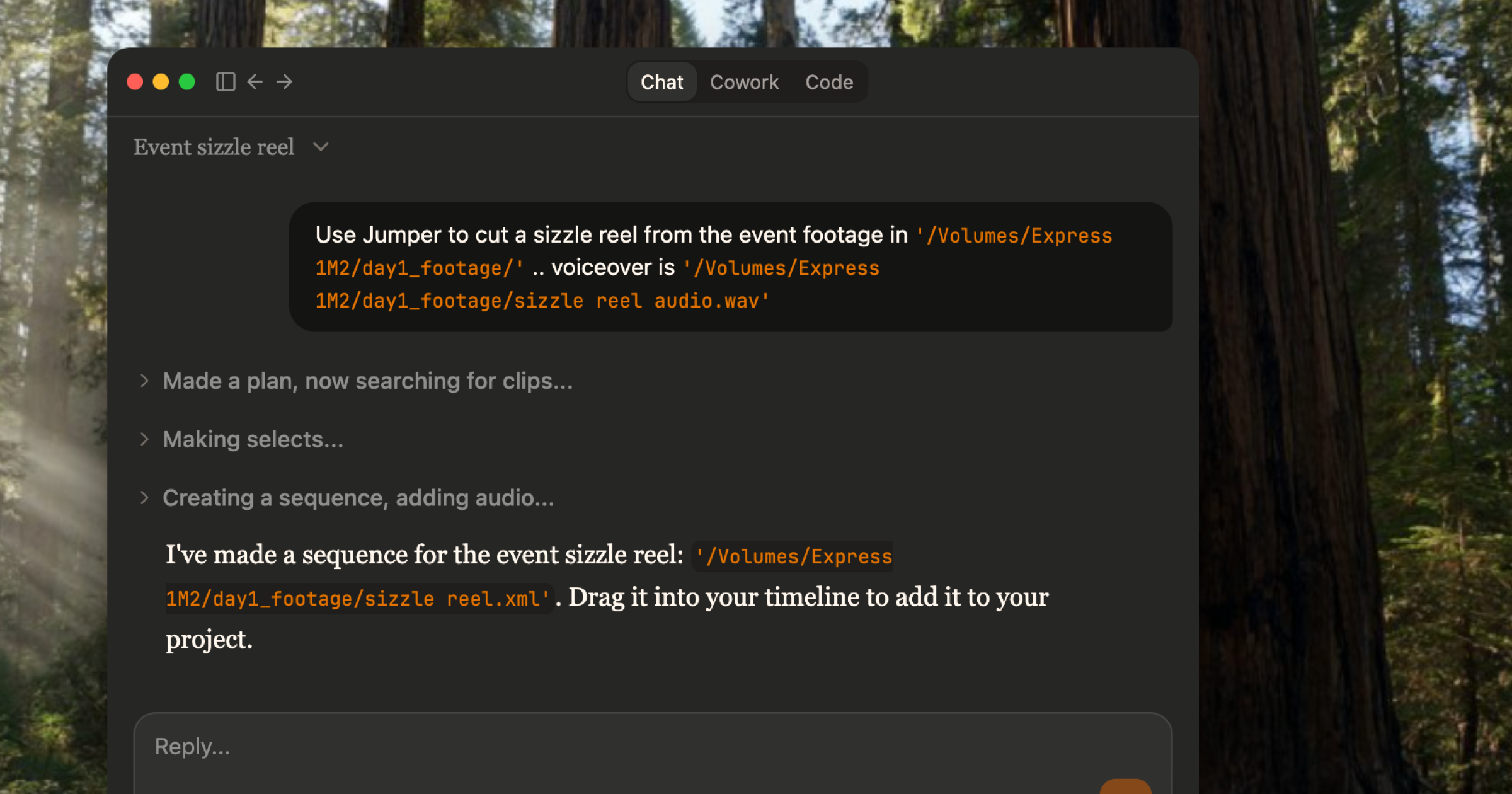
Use Jumper to cut a sizzle reel from the event footage in /day1\_footage/ with the voiceover sizzle\_reel\_audio.wav.
Worked for 1m 15s
Export finished. The sizzle reel with synced voiceover has been created.
**Sequence file:** \~/day1\_footage/sizzle\_reel\_with\_vo.xml
* **Clips:** 12 (cut to match voiceover timing)
* **Voiceover:** sizzle\_reel\_audio.wav (synced)
Drag it to your timeline to add it to your project.
## Parallel workflows
Jumper can server multiple agents sessions at the same time. As each agent can work on different tasks, you can fire off several jobs in parallel and focus on other work while they complete.
## Skills in Agentic Editing
Skills are how you encode repeatable editing workflows for the agent. Each skill is a SKILL.md file that defines when the workflow should be used, what steps it runs, and how results should be returned.
### Why skills matter
* **Predictable behavior** — Same workflow runs consistently across sessions and across editors.
* **Shorter prompts** — Process logic lives in reusable instructions instead of long conversation context.
* **Standardized quality** — Teams can enforce naming conventions, export formats, and review checks.
* **Specialized workflows** — Complex or domain-specific steps stay out of the general conversation loop.
### What you can customize
1. **Modify shipped skills** — Tune existing workflows for your editorial style (clip length bias, pacing, selection thresholds, export defaults).
2. **Add new skills** — Create workflows for jobs your team repeats often (e.g., social cutdowns, b-roll sequences, interview selects).
To learn how to add custom skills, see [Add a custom skill](/guides/add-custom-skill).
## Compatibility
Jumper is currently compatible with:
* **Claude Code Desktop**
* **Claude Code CLI**
* **OpenAI Codex Desktop**
* **LM Studio**
Claude Cowork currently does not reliably pick up the Jumper integration. For Jumper workflows, use Claude Code Desktop or Claude Code CLI.
To connect Jumper to an AI agent, use the **AI Agent** section in the [Settings tab](/interface/settings-tab#ai-agent). Setup is one-click for Claude and Codex.
For LM Studio, use the [LM Studio setup guide](/guides/lm-studio). That workflow uses LM Studio's own MCP integrations instead of Jumper's one-click install buttons.
## On Privacy
**Will my footage be uploaded to AI companies?** No.
Here's how it works: the agent (Claude, Codex, etc.) talks to Jumper via MCP (an open standard for AI agents to "talk" with software).
It sends *commands* like "search for shots of Anna smiling" or "export clips to this folder." Jumper runs a **local server** on your machine (localhost). All the heavy work (visual search, transcription, face recognition) happens **on your computer**. Your footage never leaves it.
What the agent receives back is **metadata** only: file paths, timecodes, transcript excerpts, search result lists. The agent orchestrates the workflow; Jumper does the actual analysis locally and returns pointers to where things are, not the footage itself.
For a detailed breakdown of what data the agent receives and how model providers handle it, see [Agentic editing and data privacy](/core-concepts/agentic-editing-privacy).
## Related
Step-by-step walkthrough of searching and exporting clips via an AI agent
Configure and connect Claude or Codex to Jumper