> ## Documentation Index
> Fetch the complete documentation index at: https://docs.getjumper.io/llms.txt
> Use this file to discover all available pages before exploring further.
# Create a Summary
> Run a Summary Analysis on selected footage and explore the layered result
Summary Analysis requires a Jumper Pro license.
Create a Summary Analysis for one file or a batch, then open the layered result in **Summaries**. For what summaries are and when to use them, see [Summary Analysis](/core-concepts/summary-analysis).
## Before you begin
* The file must have completed [visual analysis](/core-concepts/processing).
* [Speech analysis](/core-concepts/speech-search) and [face analysis](/core-concepts/face-detection) are optional, but they can add useful dialogue and character context.
* Naming recognized people in the [People tab](/interface/people-tab) can make the result more useful.
* An AI summarization model must be downloaded to your computer. Choose **Small**, **Medium**, **Large**, or **Extra large**. The model runs locally with the rest of Jumper's analysis.
## Create the analysis
Open **Media** and make sure the footage has completed visual analysis.
For a batch, select the media and use the **Summary Analysis** document control. For one file, use its configuration gear.
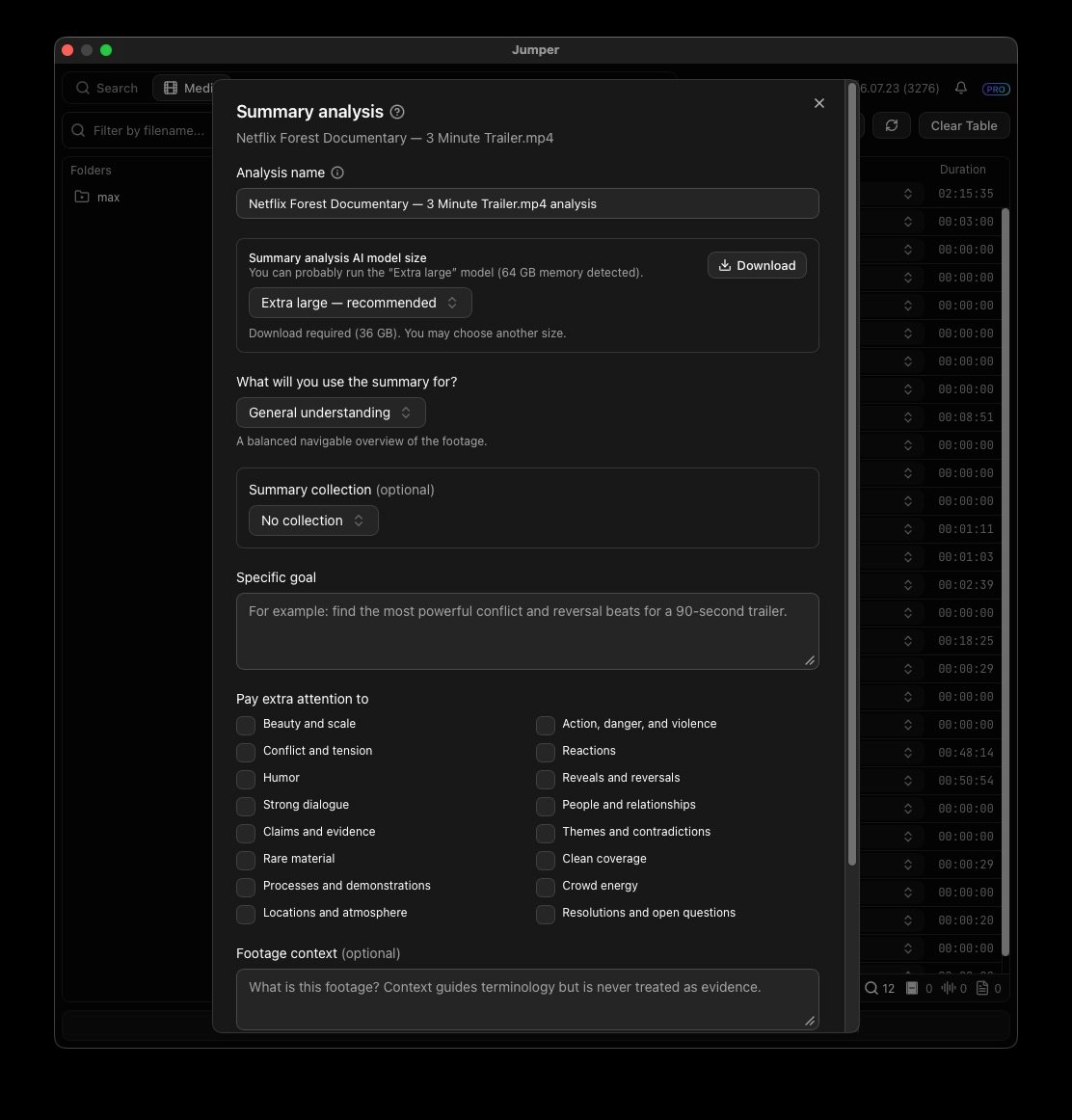
Enter a meaningful **Analysis name** that describes its editorial use, such as “Day 2 interviews — documentary research” or “Championship final — highlight moments.”
Select **Small**, **Medium**, **Large**, or **Extra large**. Download the selected AI summarization model if it is not already available locally.
Select a built-in purpose to give the analysis an editorial lens, or choose **Use only my instructions** when you want the analysis guided only by your own directions and priorities.
Optionally describe the question or deliverable you have in mind. Keep it concrete, such as “Identify the strongest conflict and reversal beats for a 90-second trailer.”
Under **Pay extra attention to**, select the areas that matter most to the edit, such as strong dialogue, reactions, people and relationships, themes, reveals, action, or atmosphere.
If useful, add **Footage context**, choose a **Summary collection**, include the transcript, select an output language, and allow named-person evidence from face analysis.
Add the analysis, then start processing the selected media.
Open **Summaries**. Start with the overview, then navigate into progressively more detailed sections, source time ranges, and source previews.
 ## Purpose and Specific goal
Use these settings together when you configure the analysis:
| Setting | What it does | Example |
| ---------------------------- | ------------------------------------------------------------------------------------------------------------------------- | -------------------------------------------------------------------------------------------------- |
| **Built-in purpose** | Adds a familiar editorial lens to the whole analysis. | Documentary research, trailer creation, archive discovery, interview selects, or continuity review |
| **Specific goal** | Adds your instructions to the selected purpose. | “Track how the relationship changes after the second interview.” |
| **Use only my instructions** | Applies your **Specific goal** and selected **Pay extra attention to** priorities without adding a built-in purpose lens. | A specialized review that does not fit the available purposes |
Choose the purpose closest to the work, then use **Specific goal** to make it particular to this footage and deliverable.
## Next steps
* Create another analysis of the same file with a different goal. Later runs can reuse the initial observations from the first analysis.
* Group related analyses in a **Summary collection** when you want to compare material across files.
* Hand the result to an [AI agent](/core-concepts/agentic-editing) for research or selects work. Treat the summary as navigation context, not final source evidence.
## Purpose and Specific goal
Use these settings together when you configure the analysis:
| Setting | What it does | Example |
| ---------------------------- | ------------------------------------------------------------------------------------------------------------------------- | -------------------------------------------------------------------------------------------------- |
| **Built-in purpose** | Adds a familiar editorial lens to the whole analysis. | Documentary research, trailer creation, archive discovery, interview selects, or continuity review |
| **Specific goal** | Adds your instructions to the selected purpose. | “Track how the relationship changes after the second interview.” |
| **Use only my instructions** | Applies your **Specific goal** and selected **Pay extra attention to** priorities without adding a built-in purpose lens. | A specialized review that does not fit the available purposes |
Choose the purpose closest to the work, then use **Specific goal** to make it particular to this footage and deliverable.
## Next steps
* Create another analysis of the same file with a different goal. Later runs can reuse the initial observations from the first analysis.
* Group related analyses in a **Summary collection** when you want to compare material across files.
* Hand the result to an [AI agent](/core-concepts/agentic-editing) for research or selects work. Treat the summary as navigation context, not final source evidence.