> ## Documentation Index
> Fetch the complete documentation index at: https://docs.getjumper.io/llms.txt
> Use this file to discover all available pages before exploring further.
# Uninstall Jumper
> A step-by-step guide to uninstalling Jumper
The best way to uninstall Jumper is through the Uninstall tool. You can find the Uninstall tool in the DMG download for Jumper.
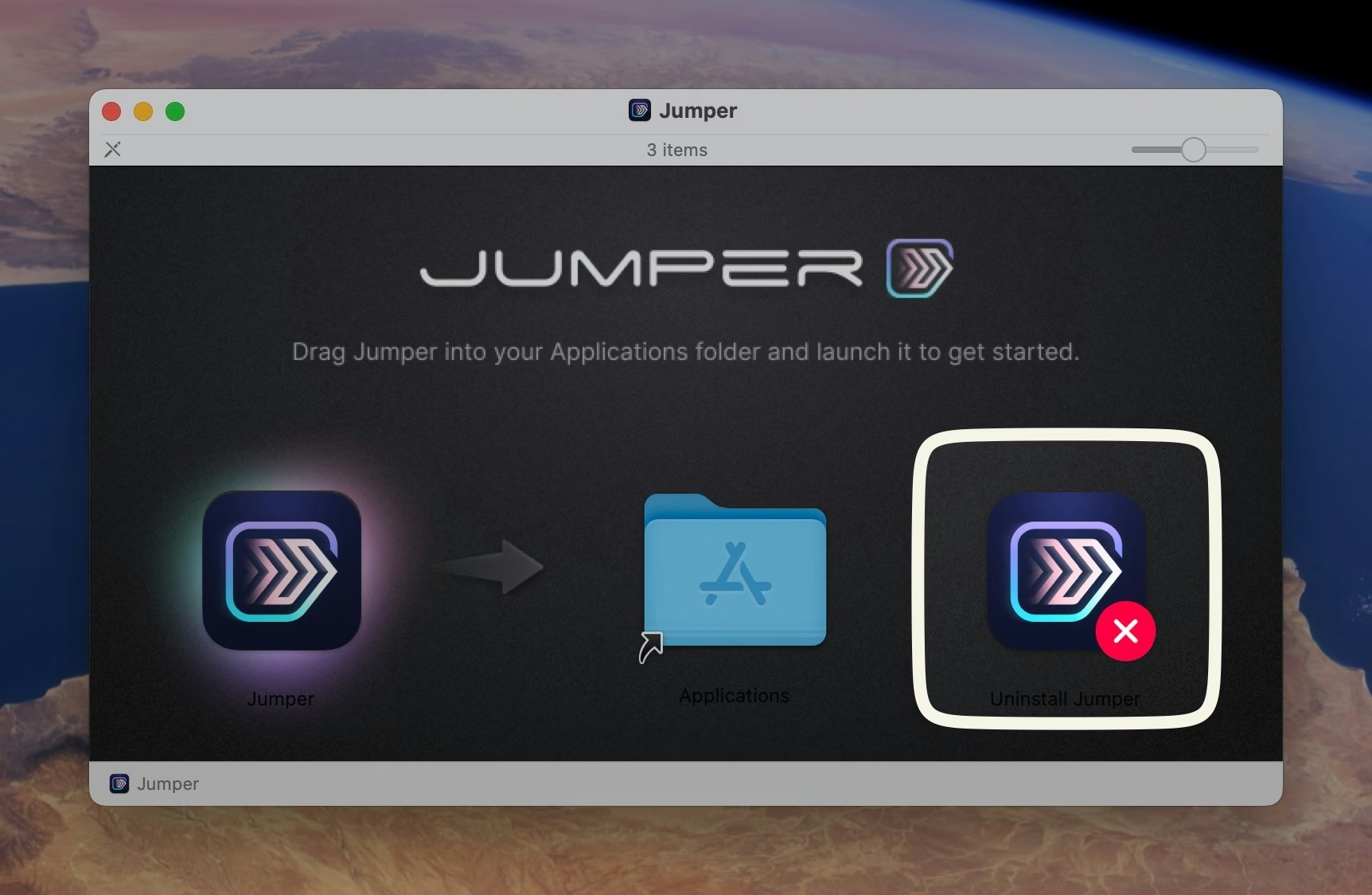 Some folders will be protected by macOS, so you can either give the the Uninstall Tool Full Disk Access or remove certain files manually.
When you run the Uninstall tool you'll be presented with this:
Some folders will be protected by macOS, so you can either give the the Uninstall Tool Full Disk Access or remove certain files manually.
When you run the Uninstall tool you'll be presented with this:
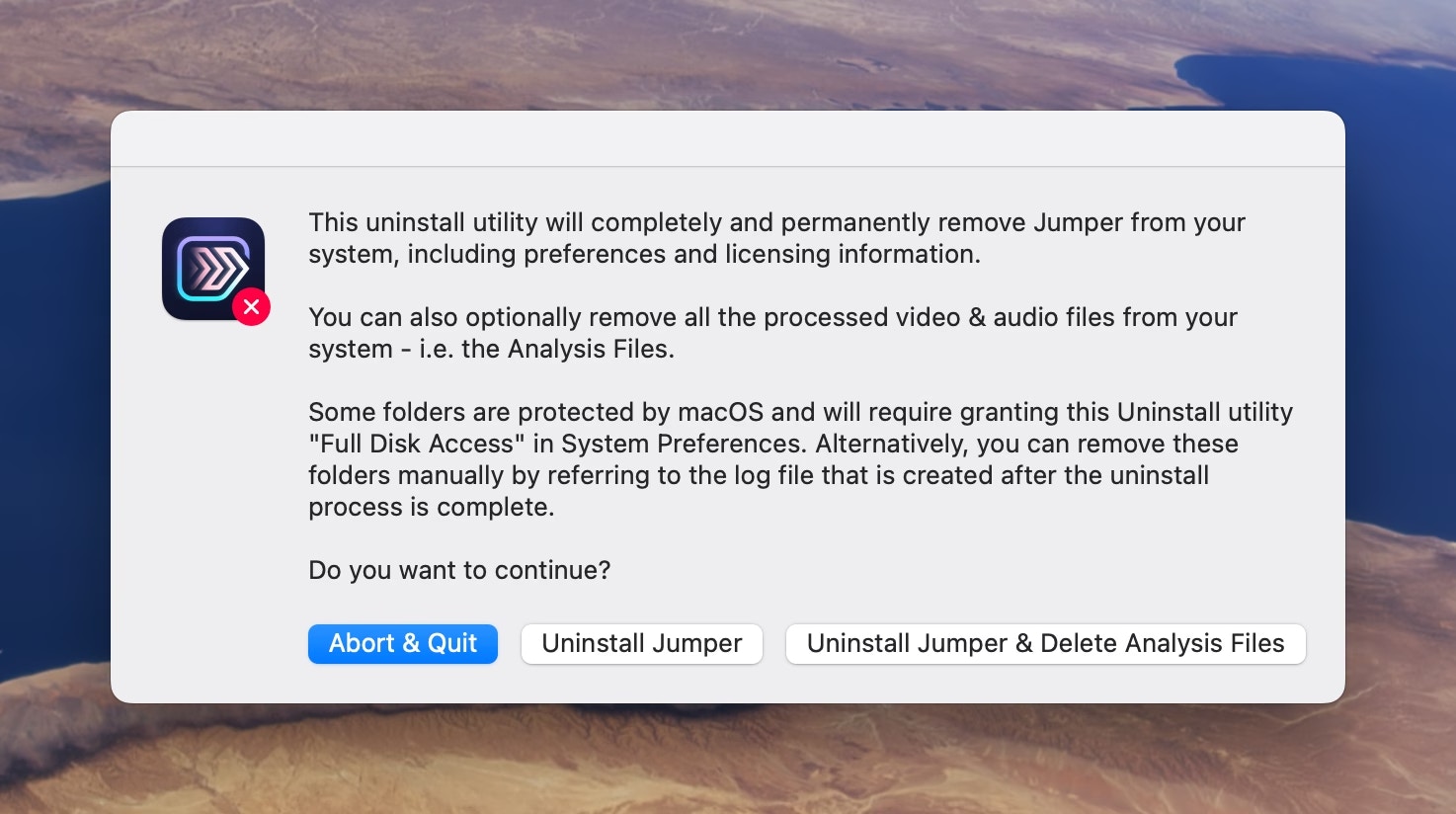 Click `Uninstall Jumper` if you want to uninstall the Jumper application, Preferences and License details.
Click `Uninstall Jumper & processed files` if you also want to remove all the processed video and audio files.
You will be requested to enter your macOS password:
Click `Uninstall Jumper` if you want to uninstall the Jumper application, Preferences and License details.
Click `Uninstall Jumper & processed files` if you also want to remove all the processed video and audio files.
You will be requested to enter your macOS password:
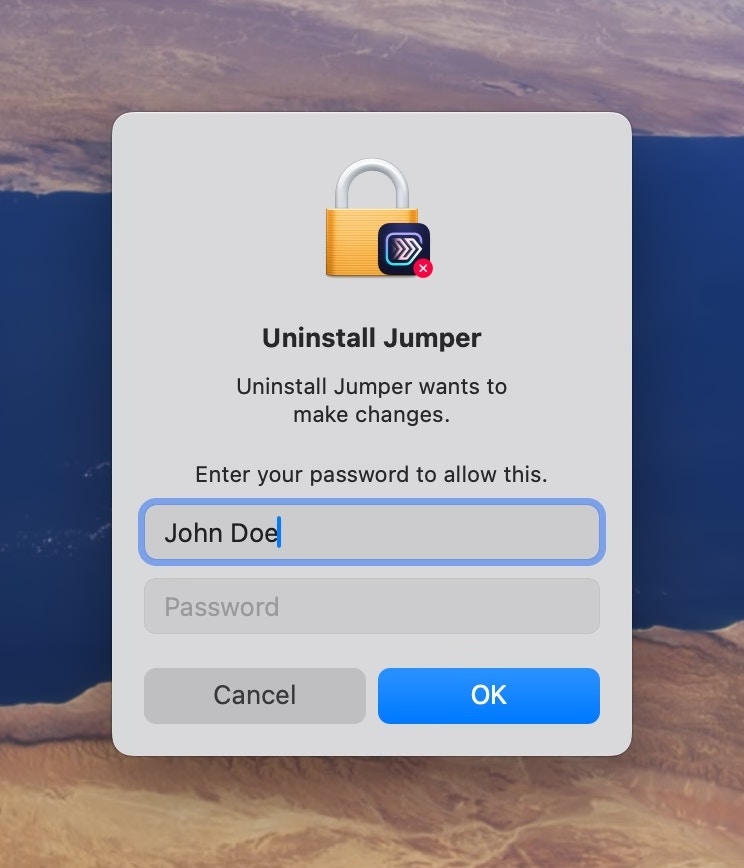 A file called `Jumper Uninstall Log.txt` will be added to your Desktop, and look something like this:
```
Deleted Files and Folders:
/Applications/Jumper.app
/Library/Application Support/Adobe/CEP/extensions/Jumper
/Users/chrishocking/.jumper/
/Users/chrishocking/Library/Logs/Jumper/
/Users/chrishocking/Library/Application Support/Jumper/
/Users/chrishocking/Library/Application Support/jumper-cache/
/Users/chrishocking/Library/Preferences/com.jumper.plist
/Users/chrishocking/Library/Application Support/Adobe/CEP/extensions/Jumper
/Users/chrishocking/Library/Caches/com.jumper
/Users/chrishocking/Library/Caches/com.jumper.jumperAccessibilityHelper
/Users/chrishocking/Library/Caches/SentryCrash/Jumper
/Users/chrishocking/Library/Caches/SentryCrash/Jumper Accessibility Helper
/Users/chrishocking/Library/HTTPStorages/com.jumper
/Users/chrishocking/Library/WebKit/com.jumper
/Users/chrishocking/Library/Application Scripts/com.jumper
/Users/chrishocking/Library/Application Scripts/com.jumper.WorkflowExtension
/Users/chrishocking/Library/Preferences/com.jumper.jumperAccessibilityHelper.plist
Undeleted Files and Folders (Manual Deletion Required):
/Users/chrishocking/Library/Containers/com.jumper.WorkflowExtension/
/Users/chrishocking/Library/Containers/com.jumper/
```
### Alternative method
Alternatively, you can uninstall Jumper by draggin the Jumper.app from your Applications folder to the Bin/Trash.
Jumper stores additional files in the following places:
* `/Library/Application Support/Adobe/CEP/extensions/Jumper`
* `~/.jumper/`
* `~/Library/Logs/Jumper/`
* `~/Library/Application Support/Jumper/`
* `~/Library/Application Support/jumper-cache/`
* `~/Library/Preferences/com.jumper.plist`
* `~/Library/Application Support/Adobe/CEP/extensions/Jumper`
* `~/Library/Caches/com.jumper`
* `~/Library/Caches/com.jumper.jumperAccessibilityHelper`
* `~/Library/Caches/SentryCrash/Jumper`
* `~/Library/Caches/SentryCrash/Jumper Accessibility Helper`
* `~/Library/HTTPStorages/com.jumper`
* `~/Library/WebKit/com.jumper`
* `~/Library/Application Scripts/com.jumper`
* `~/Library/Application Scripts/com.jumper.WorkflowExtension`
* `~/Library/Preferences/com.jumper.jumperAccessibilityHelper.plist`
* `~/Containers/com.jumper.WorkflowExtension/`
* `~/Containers/com.jumper/`
You can also manually remove these folders or use something like AppCleaner.
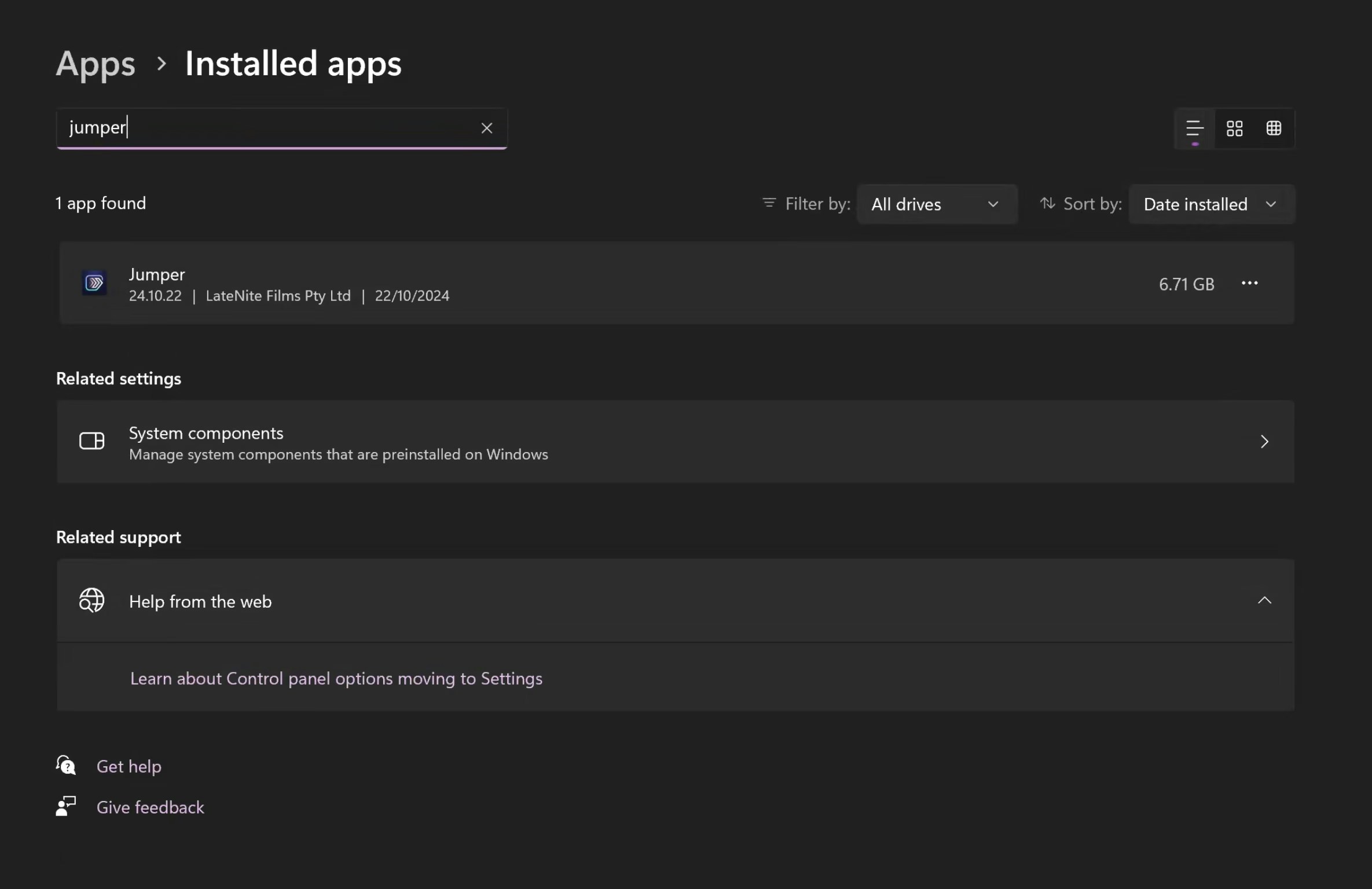
You can remove Jumper via Add & Remove Programs in Windows.
Simply search for Add & Remove Programs in the Start bar, then search for Jumper and follow the prompts.
A file called `Jumper Uninstall Log.txt` will be added to your Desktop, and look something like this:
```
Deleted Files and Folders:
/Applications/Jumper.app
/Library/Application Support/Adobe/CEP/extensions/Jumper
/Users/chrishocking/.jumper/
/Users/chrishocking/Library/Logs/Jumper/
/Users/chrishocking/Library/Application Support/Jumper/
/Users/chrishocking/Library/Application Support/jumper-cache/
/Users/chrishocking/Library/Preferences/com.jumper.plist
/Users/chrishocking/Library/Application Support/Adobe/CEP/extensions/Jumper
/Users/chrishocking/Library/Caches/com.jumper
/Users/chrishocking/Library/Caches/com.jumper.jumperAccessibilityHelper
/Users/chrishocking/Library/Caches/SentryCrash/Jumper
/Users/chrishocking/Library/Caches/SentryCrash/Jumper Accessibility Helper
/Users/chrishocking/Library/HTTPStorages/com.jumper
/Users/chrishocking/Library/WebKit/com.jumper
/Users/chrishocking/Library/Application Scripts/com.jumper
/Users/chrishocking/Library/Application Scripts/com.jumper.WorkflowExtension
/Users/chrishocking/Library/Preferences/com.jumper.jumperAccessibilityHelper.plist
Undeleted Files and Folders (Manual Deletion Required):
/Users/chrishocking/Library/Containers/com.jumper.WorkflowExtension/
/Users/chrishocking/Library/Containers/com.jumper/
```
### Alternative method
Alternatively, you can uninstall Jumper by draggin the Jumper.app from your Applications folder to the Bin/Trash.
Jumper stores additional files in the following places:
* `/Library/Application Support/Adobe/CEP/extensions/Jumper`
* `~/.jumper/`
* `~/Library/Logs/Jumper/`
* `~/Library/Application Support/Jumper/`
* `~/Library/Application Support/jumper-cache/`
* `~/Library/Preferences/com.jumper.plist`
* `~/Library/Application Support/Adobe/CEP/extensions/Jumper`
* `~/Library/Caches/com.jumper`
* `~/Library/Caches/com.jumper.jumperAccessibilityHelper`
* `~/Library/Caches/SentryCrash/Jumper`
* `~/Library/Caches/SentryCrash/Jumper Accessibility Helper`
* `~/Library/HTTPStorages/com.jumper`
* `~/Library/WebKit/com.jumper`
* `~/Library/Application Scripts/com.jumper`
* `~/Library/Application Scripts/com.jumper.WorkflowExtension`
* `~/Library/Preferences/com.jumper.jumperAccessibilityHelper.plist`
* `~/Containers/com.jumper.WorkflowExtension/`
* `~/Containers/com.jumper/`
You can also manually remove these folders or use something like AppCleaner.
You can remove Jumper via Add & Remove Programs in Windows.
Simply search for Add & Remove Programs in the Start bar, then search for Jumper and follow the prompts.