> ## Documentation Index
> Fetch the complete documentation index at: https://docs.getjumper.io/llms.txt
> Use this file to discover all available pages before exploring further.

# Jumper Documentation

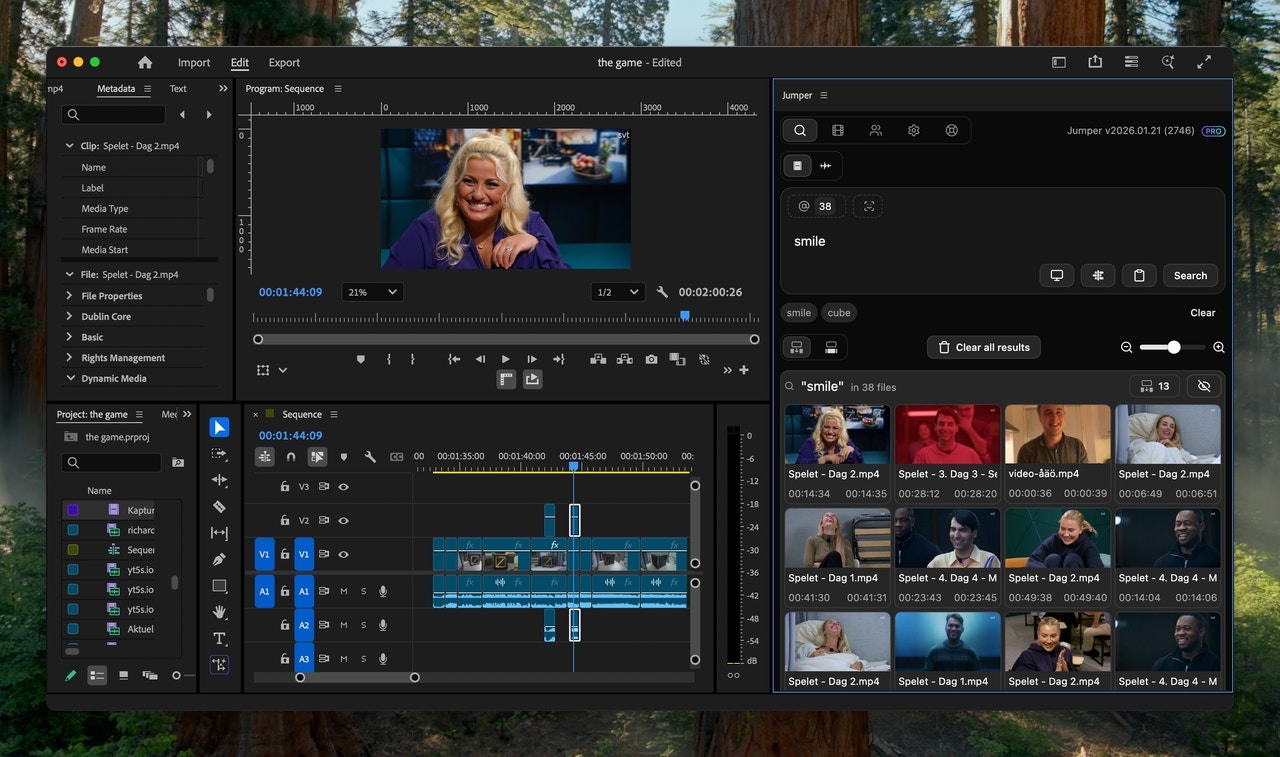
> Jumper is an AI search tool for video editors. Search your footage instantly and offline, right inside your editing software.

export const Step = ({title, children}) => {
  return null;
};

export const HorizontalSteps = ({children}) => {
  const steps = Array.isArray(children) ? children.filter(Boolean) : children ? [children] : [];
  return <div className="not-prose ">
      <div className="flex items-stretch gap-4">
        {steps.map((step, index) => {
    const stepProps = step.props || ({});
    const title = stepProps.title || "";
    const stepChildren = stepProps.children || "";
    return <div key={index} className="card block font-normal group relative my-2 ring-2 ring-transparent rounded-2xl bg-white dark:bg-background-dark border border-gray-950/10 dark:border-white/10 overflow-hidden w-full flex-1 flex flex-col">
              {}
              <div className="ml-4 mt-4 size-7 shrink-0 rounded-full bg-gray-100 dark:bg-white/10 text-xs text-gray-900 dark:text-gray-50 font-semibold flex items-center justify-center">
                <span className="text-sm font-semibold text-gray-950 dark:text-white">
                  {index + 1}
                </span>
              </div>

              {}
              <div className="px-4 pb-4 flex-1 flex flex-col">
                <h2 className="not-prose font-semibold text-base text-gray-800 dark:text-white mt-2">
                  {title}
                </h2>
                <p className="text-sm text-gray-500 dark:text-gray-400 leading-relaxed flex-1">
                  {stepChildren}
                </p>
              </div>
            </div>;
  })}
      </div>
    </div>;
};

<img src="https://mintcdn.com/jumper/32idCE5LvFcNz6ZR/images/jumper_in_premiere_smile.avif?fit=max&auto=format&n=32idCE5LvFcNz6ZR&q=85&s=8144168c76596cfe95f108a0bbe169cc" alt="jumper_in_premiere_smile.avif" width="1280" height="757" data-path="images/jumper_in_premiere_smile.avif" />

<Columns cols={2}>
  <Card title="Integrated with Editing Software">
    Works inside Adobe Premiere Pro, Final Cut Pro, DaVinci Resolve, and Avid Media Composer
  </Card>

  <Card title="Local and Offline">
    Everything runs locally and offline on your device. No cloud uploads, no internet connection required.
  </Card>
</Columns>

<Columns cols={1}>
  <Card title="Latest models">
    Jumper uses the latest models and we update them regularly.
  </Card>
</Columns>

## How it works

<HorizontalSteps>
  <Step title="Analyze media">
    Select and analyze videos, sound files or images. This is done locally and offline.
  </Step>

  <Step title="Search for anything">
    Find any visual or spoken content in milliseconds.
  </Step>
</HorizontalSteps>

<iframe className="w-full aspect-video rounded-xl hidden" src="https://www.youtube.com/embed/gW0qxPuX_lc?si=OJe5oFZMUBq3cIpB" title="YouTube video player" frameBorder="0" allow="accelerometer; autoplay; clipboard-write; encrypted-media; gyroscope; picture-in-picture; web-share" referrerPolicy="strict-origin-when-cross-origin" allowFullScreen />

## Key Features

<CardGroup cols={2}>
  <Card title="Visual search" icon="film">
    Search in footage using natural language keywords to retrieve relevant clips, no manual tagging required.
  </Card>

  <Card title="Instant Speech Search" icon="microphone">
    Pinpoint specific spoken words or phrases across 111 supported languages, making it easy to locate dialogue in footage.
  </Card>

  <Card title="Face Detection & People Search" icon="face-smile">
    Instantly find every moment a person appears across your entire library.
  </Card>

  <Card title="Integrations" icon="code">
    Jumper integrates within your editing software.
  </Card>

  <Card title="Unlimited & Offline" icon="download">
    Jumper operates entirely offline, ensuring privacy and speed. No limit on analysis or usage.
  </Card>

  <Card title="Model updates" icon="sparkles">
    Access the latest ML models shortly after release.
  </Card>
</CardGroup>

## Explore more

<CardGroup cols={2}>
  <Card title="Quickstart" icon="chalkboard-user" href="/quickstart">
    Get started with Jumper in minutes
  </Card>

  <Card title="The Interface" icon="chalkboard-user" href="/interface/search-tab">
    Master Jumper by exploring its interface and core features
  </Card>
</CardGroup>
