> ## Documentation Index
> Fetch the complete documentation index at: https://docs.getjumper.io/llms.txt
> Use this file to discover all available pages before exploring further.
# Script tab reference
> Controls and behavior of Jumper's dedicated full-transcript workspace
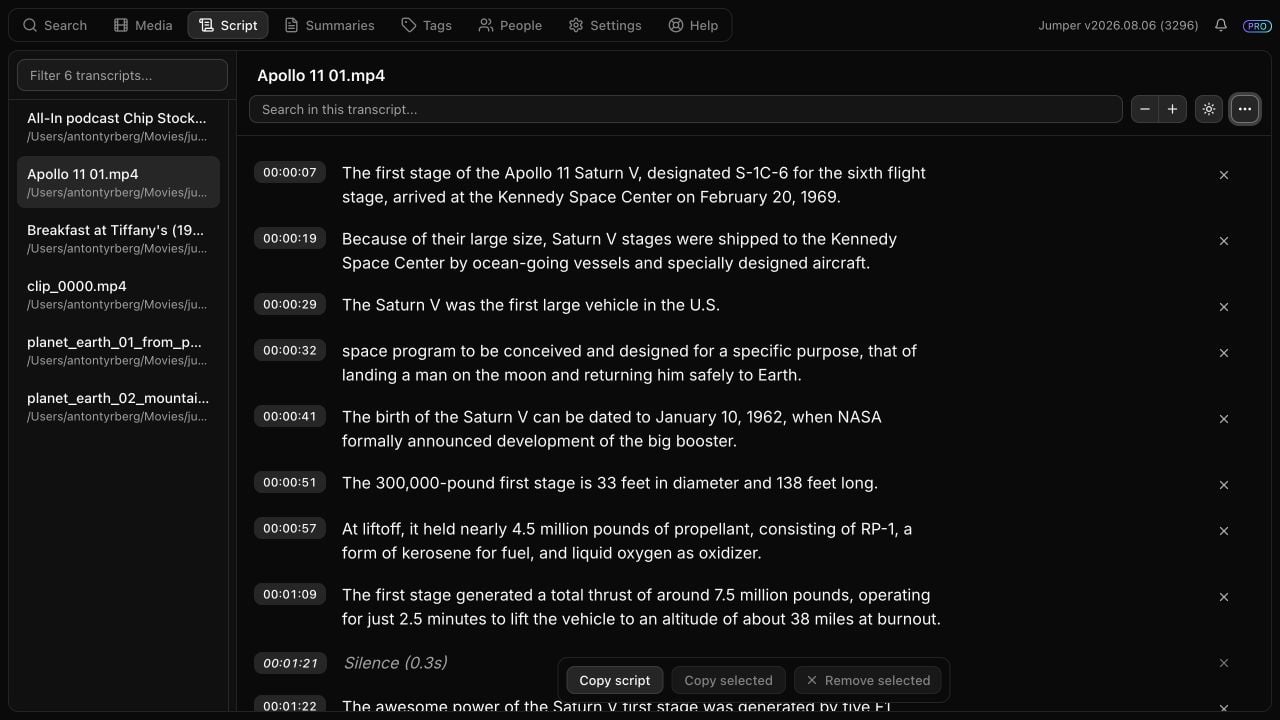
The **Script** tab is Jumper's persistent workspace for speech-analyzed transcripts. The selected transcript remains available when the user moves between other tabs.
 ## Transcript availability and selection
| Element or action | Behavior |
| ---------------------------------- | ----------------------------------------------------------------------------------------------------------------------------------------- |
| Available transcripts | Includes media with speech analysis, loaded transcripts, and a transcript selected from elsewhere in Jumper. Duplicate paths are removed. |
| Desktop sidebar | Lists available transcripts with file names and paths. |
| **Filter transcripts** | Filters the sidebar by file name or full path. The placeholder reports the number of available transcripts. |
| Sidebar divider | Resizes the transcript list. The sidebar retains a minimum usable width. |
| Compact-screen selector | Replaces the hidden sidebar with a file-name selector above the toolbar. |
| **Media → View transcript** | Switches to the Script tab and selects that file. |
| Speech result → **Show in script** | Switches to the Script tab, selects that file, and navigates to the matching segment. |
## Toolbar
| Control | Behavior |
| ----------------------------- | ------------------------------------------------------------------------------------------------------------- |
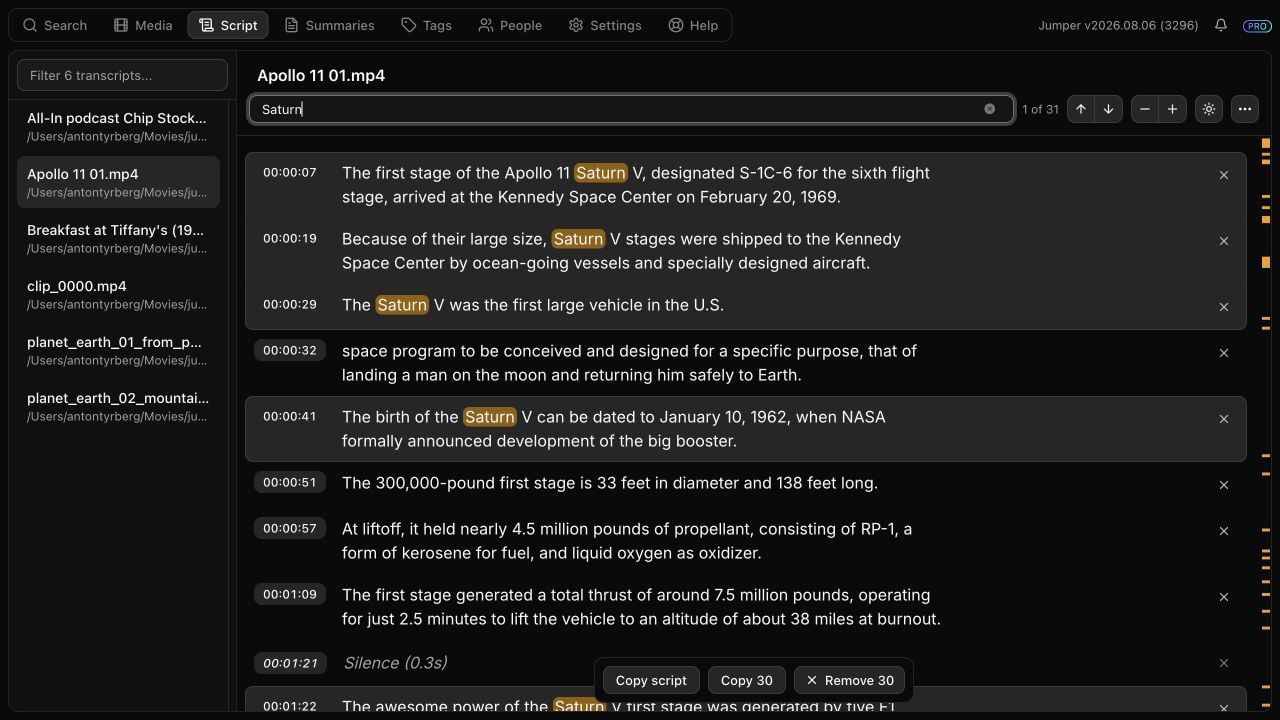
| **Search in this transcript** | Highlights matching text in visible script lines. Removed lines are excluded from the count and navigation. |
| Match count | Displays the current match and total matches. Displays **No matches** when applicable. |
| Up/down arrows | Move to the previous or next match and scroll it into view. |
| **Minus/Plus** | Decreases or increases transcript text size within the supported range. |
| **Sun/Moon** | Switches only the transcript workspace between light and dark. It does not change Jumper's application theme. |
| **Ellipsis** | Opens copy, export, edit-reset, font, timestamp, and documentation options. |
The marks beside the scrollbar summarize transcript search matches and the current viewport using rendered row positions. They update when removed groups expand or collapse.
## Transcript availability and selection
| Element or action | Behavior |
| ---------------------------------- | ----------------------------------------------------------------------------------------------------------------------------------------- |
| Available transcripts | Includes media with speech analysis, loaded transcripts, and a transcript selected from elsewhere in Jumper. Duplicate paths are removed. |
| Desktop sidebar | Lists available transcripts with file names and paths. |
| **Filter transcripts** | Filters the sidebar by file name or full path. The placeholder reports the number of available transcripts. |
| Sidebar divider | Resizes the transcript list. The sidebar retains a minimum usable width. |
| Compact-screen selector | Replaces the hidden sidebar with a file-name selector above the toolbar. |
| **Media → View transcript** | Switches to the Script tab and selects that file. |
| Speech result → **Show in script** | Switches to the Script tab, selects that file, and navigates to the matching segment. |
## Toolbar
| Control | Behavior |
| ----------------------------- | ------------------------------------------------------------------------------------------------------------- |
| **Search in this transcript** | Highlights matching text in visible script lines. Removed lines are excluded from the count and navigation. |
| Match count | Displays the current match and total matches. Displays **No matches** when applicable. |
| Up/down arrows | Move to the previous or next match and scroll it into view. |
| **Minus/Plus** | Decreases or increases transcript text size within the supported range. |
| **Sun/Moon** | Switches only the transcript workspace between light and dark. It does not change Jumper's application theme. |
| **Ellipsis** | Opens copy, export, edit-reset, font, timestamp, and documentation options. |
The marks beside the scrollbar summarize transcript search matches and the current viewport using rendered row positions. They update when removed groups expand or collapse.
 ## Transcript rows and removed groups
| Element or interaction | Behavior |
| ---------------------- | ----------------------------------------------------------------------------------------------------------------------- |
| Transcript line | Displays transcript text and, when enabled, its start timecode. |
| Speaker badge | Identifies the assigned or detected speaker for the following lines. Selecting the badge opens speaker naming controls. |
| Click | Selects one line. |
| **Shift**-click | Extends the selection between the previous anchor and the selected line. |
| Double-click | Seeks the connected NLE's Source Monitor to the line's start timecode. |
| **x** | Removes that line from the local script edit. |
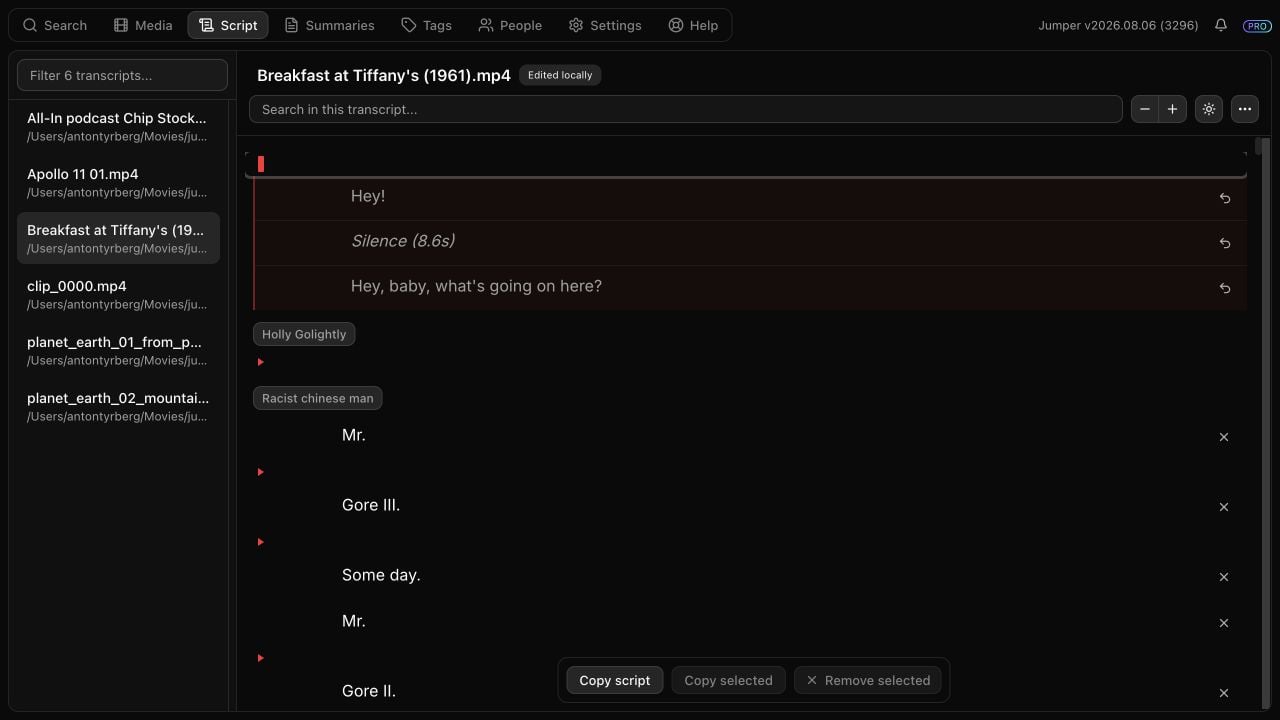
| Red triangle row | Represents one or more adjacent removed lines. The grouping preserves speaker ownership. |
| Expanded removed group | Displays removed lines with their normal timestamp indentation, text width, wrapping, and speaker label. |
| Restore arrow | Restores one expanded line without restoring the rest of its group. |
The entire red marker row toggles a removed group. Expanding a group displays its contents but does not restore them.
## Transcript rows and removed groups
| Element or interaction | Behavior |
| ---------------------- | ----------------------------------------------------------------------------------------------------------------------- |
| Transcript line | Displays transcript text and, when enabled, its start timecode. |
| Speaker badge | Identifies the assigned or detected speaker for the following lines. Selecting the badge opens speaker naming controls. |
| Click | Selects one line. |
| **Shift**-click | Extends the selection between the previous anchor and the selected line. |
| Double-click | Seeks the connected NLE's Source Monitor to the line's start timecode. |
| **x** | Removes that line from the local script edit. |
| Red triangle row | Represents one or more adjacent removed lines. The grouping preserves speaker ownership. |
| Expanded removed group | Displays removed lines with their normal timestamp indentation, text width, wrapping, and speaker label. |
| Restore arrow | Restores one expanded line without restoring the rest of its group. |
The entire red marker row toggles a removed group. Expanding a group displays its contents but does not restore them.
 ## Script options menu
| Option | Behavior |
| ------------------------------- | ------------------------------------------------------------------------------------------------- |
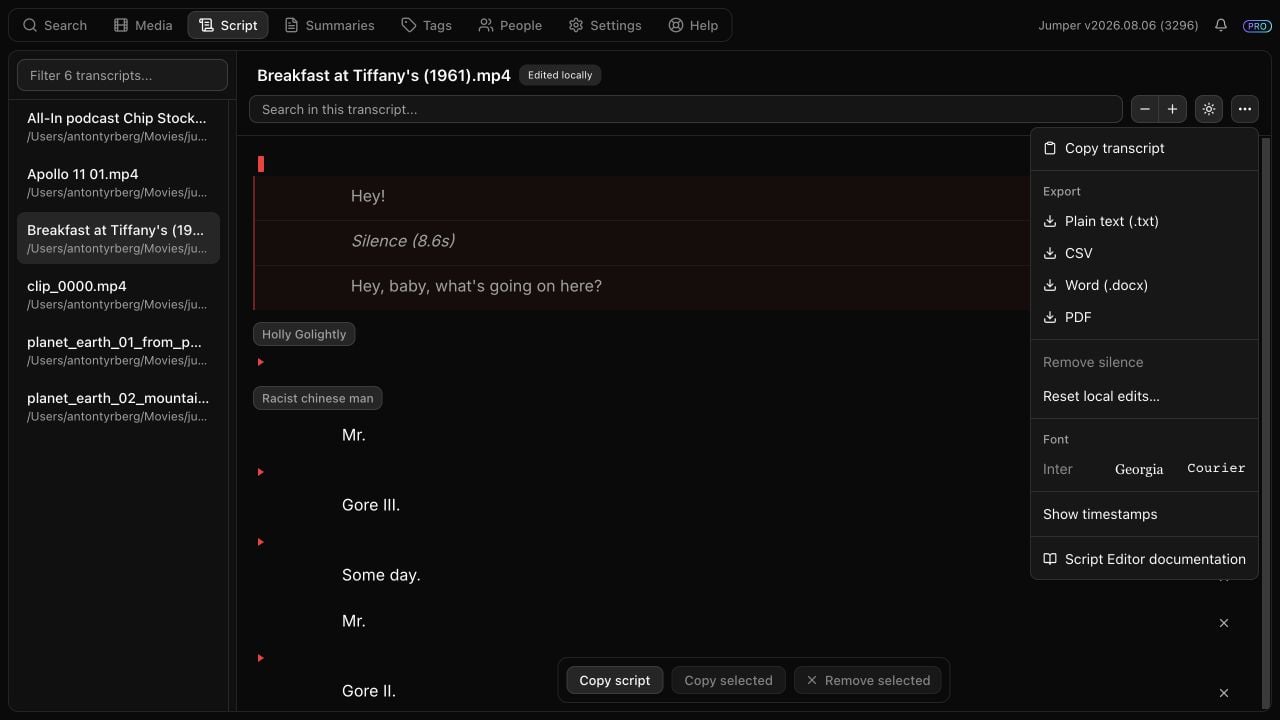
| **Copy transcript** | Copies the complete authoritative transcript, including lines removed from the local script edit. |
| **Plain text (.txt)** | Exports the current edited script as plain text. |
| **CSV** | Exports the current edited script as CSV. |
| **Word (.docx)** | Exports the current edited script as a Word document. |
| **PDF** | Exports the current edited script as PDF. |
| **Remove silence** | Removes all currently visible detected silence. The menu label includes its total duration. |
| **Reset local edits…** | Opens a confirmation dialog that restores every removed line and silence entry. |
| **Inter / Georgia / Courier** | Selects the transcript and export font. |
| **Hide/Show timestamps** | Controls timecode visibility in the transcript workspace. |
| **Script Editor documentation** | Opens the Script Editor guide in the system browser. |
## Script options menu
| Option | Behavior |
| ------------------------------- | ------------------------------------------------------------------------------------------------- |
| **Copy transcript** | Copies the complete authoritative transcript, including lines removed from the local script edit. |
| **Plain text (.txt)** | Exports the current edited script as plain text. |
| **CSV** | Exports the current edited script as CSV. |
| **Word (.docx)** | Exports the current edited script as a Word document. |
| **PDF** | Exports the current edited script as PDF. |
| **Remove silence** | Removes all currently visible detected silence. The menu label includes its total duration. |
| **Reset local edits…** | Opens a confirmation dialog that restores every removed line and silence entry. |
| **Inter / Georgia / Courier** | Selects the transcript and export font. |
| **Hide/Show timestamps** | Controls timecode visibility in the transcript workspace. |
| **Script Editor documentation** | Opens the Script Editor guide in the system browser. |
 ## Floating action bar
| Product mode | Controls |
| ----------------- | ------------------------------------------------------------------------------ |
| Jumper Standalone | **Copy script**, **Copy selected**, and **Remove selected** |
| NLE integrations | **Add all to timeline**, **Add selected to timeline**, and **Remove selected** |
**Copy script**, exports, and **Add all to timeline** operate on the current edited script and exclude removed lines. **Copy transcript** is the explicit action for copying the complete original transcript.
## Keyboard behavior
| Context | Shortcut | Behavior |
| ----------------- | --------------------------- | ----------------------------------------------- |
| Transcript search | **Enter** | Next match |
| Transcript search | **Shift** + **Enter** | Previous match |
| Selected lines | **Backspace** or **Delete** | Remove the selection from the local script edit |
## Local edits and persistence
| Property or state | Behavior |
| -------------------------------- | --------------------------------------------------------------------------------------------------------------------------------- |
| Storage scope | Per-user local settings. Edits are not stored in shared speech analysis data. |
| Authoritative data | The original transcription, shared analysis, and media file remain unchanged. |
| Saved content | Removed transcript segment indices and removed silence positions. |
| Automatic saving | Removals and restores save without a separate save command. |
| **Saving local edits…** | A persistence write is in progress. |
| **Edited locally** | The transcript has saved removed items. |
| Transcript switching and restart | Saved edits are reapplied when the same transcript is reopened. |
| Changed transcription | Edits for the previous transcript fingerprint are not applied. Jumper reports the stale edit state and allows it to be discarded. |
| Loading failure | The unedited transcript remains visible; editing and export are disabled until loading succeeds. |
| Saving failure | Jumper reports that the latest local changes could not be saved. |
## Persisted display settings
| Setting | Scope |
| -------------------- | ------------------------------------------ |
| Text size | Transcript workspace |
| Light/dark theme | Transcript workspace only |
| Font | Transcript workspace and formatted exports |
| Timestamp visibility | Transcript workspace |
Follow the task-oriented workflow for making and outputting a paper edit.
## Floating action bar
| Product mode | Controls |
| ----------------- | ------------------------------------------------------------------------------ |
| Jumper Standalone | **Copy script**, **Copy selected**, and **Remove selected** |
| NLE integrations | **Add all to timeline**, **Add selected to timeline**, and **Remove selected** |
**Copy script**, exports, and **Add all to timeline** operate on the current edited script and exclude removed lines. **Copy transcript** is the explicit action for copying the complete original transcript.
## Keyboard behavior
| Context | Shortcut | Behavior |
| ----------------- | --------------------------- | ----------------------------------------------- |
| Transcript search | **Enter** | Next match |
| Transcript search | **Shift** + **Enter** | Previous match |
| Selected lines | **Backspace** or **Delete** | Remove the selection from the local script edit |
## Local edits and persistence
| Property or state | Behavior |
| -------------------------------- | --------------------------------------------------------------------------------------------------------------------------------- |
| Storage scope | Per-user local settings. Edits are not stored in shared speech analysis data. |
| Authoritative data | The original transcription, shared analysis, and media file remain unchanged. |
| Saved content | Removed transcript segment indices and removed silence positions. |
| Automatic saving | Removals and restores save without a separate save command. |
| **Saving local edits…** | A persistence write is in progress. |
| **Edited locally** | The transcript has saved removed items. |
| Transcript switching and restart | Saved edits are reapplied when the same transcript is reopened. |
| Changed transcription | Edits for the previous transcript fingerprint are not applied. Jumper reports the stale edit state and allows it to be discarded. |
| Loading failure | The unedited transcript remains visible; editing and export are disabled until loading succeeds. |
| Saving failure | Jumper reports that the latest local changes could not be saved. |
## Persisted display settings
| Setting | Scope |
| -------------------- | ------------------------------------------ |
| Text size | Transcript workspace |
| Light/dark theme | Transcript workspace only |
| Font | Transcript workspace and formatted exports |
| Timestamp visibility | Transcript workspace |
Follow the task-oriented workflow for making and outputting a paper edit.