

Panel won’t open
On newer versions of Avid Media Composer (2025.12 and later), Jumper is now available in the Extensions menu.
1
Open the Console
Go to Tools -> Console
2
Restart the PanelSDK
In the Console window that opens, type inand hit Enter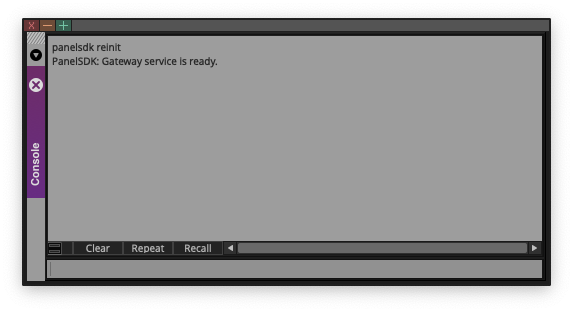
3
Try again if you get an error message
If you get some error message, enter the command again until you see “PanelSDK: Gateway service is ready.”
4
Restart your computer
If Jumper still doesn’t appear, restart your computer. Several users have found this fixes it (we’re not sure why, and are actively discussing with the Avid team).
Can’t add media
Media won’t load or you see “can’t link to a clip”? See Adding media for the full workflow and common fixes:- Clips not selected — For All Selected Clips, select clips in the bin before clicking Load Media.
- Scan not run — For unanalyzed transcoded MXF, run Scan MXF Metadata first. Analyzed MXF can skip the scan step.
Mark IN/OUT or Source Viewer search fails
Jumper uses Avid’s default I (Mark IN), O (Mark OUT), and Q (Go to IN point) shortcuts. Custom shortcuts for these keys will break navigation and Source Viewer search. See Required shortcuts in the installation guide.Scan MXF Metadata / Scan Avid MediaFiles fails
If Scan MXF Metadata or Scan Avid MediaFiles still doesn’t successfully scan the drive that contains your Avid media, contact us on the Discord.Installation issues
If the Jumper panel fails to install or enable:- Close Avid and helper apps — Quit Avid Media Composer and
avid-api-gateway(and any other Avid helper processes) in Activity Monitor (macOS) or Task Manager (Windows) before enabling Jumper. - Re-run the enable step — In Jumper.app, click Enable Jumper in Avid Media Composer again.